Want to know how much website downtime costs, and the impact it can have on your business?
Find out everything you need to know in our new uptime monitoring whitepaper 2021


[lead]As a direct result of feedback received from our users in the latest customer Survey (January 2016) we’ve been busy working on the features and improvements you’ve asked for. Today we’re happy to announce the first of these new features; ‘Page Speed Monitoring’.[/lead]
This new feature is being offered to all our paid users, and with no limits so if you already have a paid plan you can start using Page Speed Monitoring right away
StatusCake Page Speed Monitoring uses a chrome instance and loads all the content from your site, external and internal. This means what you see is what your customers get. Each test is performed using dedicated bandwidth resources at 250kb/s.
We know that uptime is only half the battle, if your site isn’t performing how it should be then you’ll lose visitors, and even more importantly your brand reputation will be damaged” – Daniel Clarke, StatusCake CTO

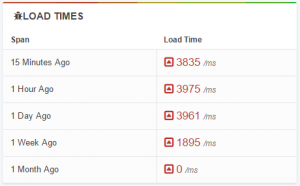
We store all page load times indefinitely for all users so you can dive into your historic performance to see if you’re moving in the right direction. You can dive in and find out the load time, page size, requests made (and then drill into each request) and even the content type distribution.
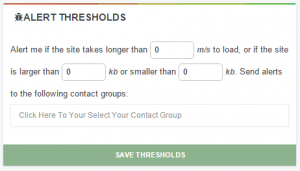
Of course being able to dive into historic data is only half the battle – StatusCake Page Speed Monitoring allows you to set trigger thresholds on metrics such as page load time and Page Size and then get alerted via your pre-existing contact groups.
[themo_button text=”Give Page Speed a Try, Sign Up Now” url=”https://www.statuscake.com/pagespeed-monitoring” type=”standard”]
Share this
3 min read In the previous posts, we’ve looked at how alert noise emerges from design decisions, why notification lists fail to create accountability, and why alerts only work when they’re designed around a clear outcome. Taken together, these ideas point to a broader conclusion. That alerting is not just a technical system, it’s a socio-technical one. Alerting
3 min read In the first two posts of this series, we explored how alert noise emerges from design decisions, and why notification lists fail to create accountability when responsibility is unclear. There’s a deeper issue underneath both of those problems. Many alerting systems are designed without being clear about the outcome they’re meant to produce. When teams
3 min read In the previous post, we looked at how alert noise is rarely accidental. It’s usually the result of sensible decisions layered over time, until responsibility becomes diffuse and response slows. One of the most persistent assumptions behind this pattern is simple. If enough people are notified, someone will take responsibility. After more than fourteen years
3 min read In a previous post, The Incident Checklist: Reducing Cognitive Load When It Matters Most, we explored how incidents stop being purely technical problems and become human ones. These are moments where decision-making under pressure and cognitive load matter more than perfect root cause analysis. When systems don’t support people clearly in those moments, teams compensate.
4 min read In the previous post, we looked at what happens after detection; when incidents stop being purely technical problems and become human ones, with cognitive load as the real constraint. This post assumes that context. The question here is simpler and more practical. What actually helps teams think clearly and act well once things are already
3 min read In the previous post, we explored how AI accelerates delivery and compresses the time between change and user impact. As velocity increases, knowing that something has gone wrong before users do becomes a critical capability. But detection is only the beginning. Once alerts fire and dashboards light up, humans still have to interpret what’s happening,
Find out everything you need to know in our new uptime monitoring whitepaper 2021