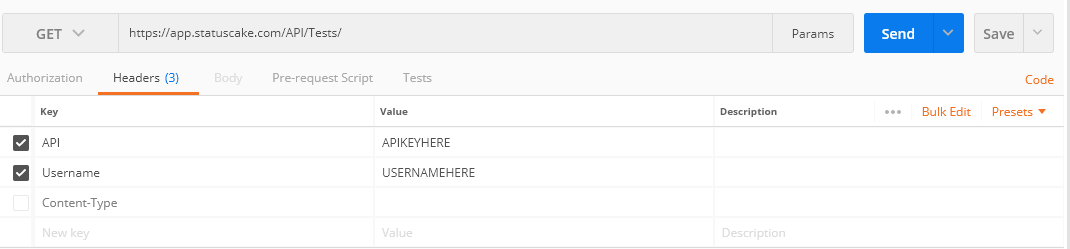
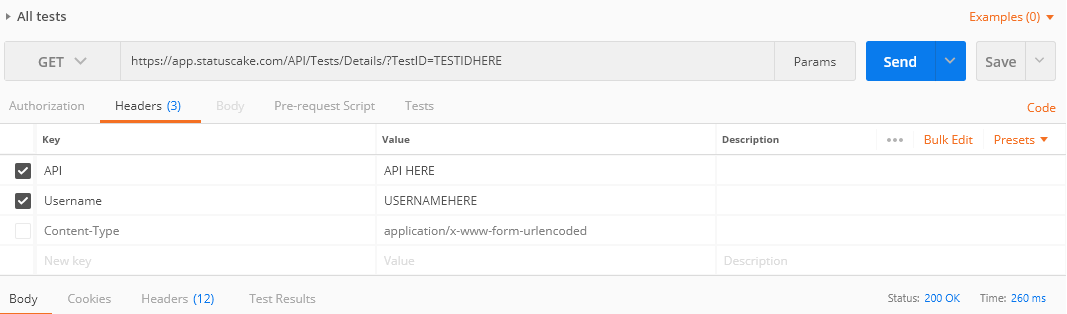
In this post, we’ll take you through how to list tests from your account, and their detailed settings through the API. There are two functions involved here, first is the function that lists ALL tests on the account with important settings, and second is a more detailed call for a single test. As usual, we’ll take you through this process for both of these using PHP, bash, Python, and Postman.
PHP Example 1 – Get all tests
[blockquote align=”left” reverse=”off”]
<?php // Auth the request $API = “l6OxVJilcD2cETMoNRvn”; $Username = “StatusCake”; // Create the CURL $ch = curl_init(“https://app.statuscake.com/API/Tests/”); curl_setopt($ch, CURLOPT_RETURNTRANSFER, true); curl_setopt($ch, CURLOPT_CUSTOMREQUEST, “POST”); curl_setopt($ch, CURLOPT_HTTPHEADER, array( “API: “.$API, “Username: “.$Username )); // For Debugging $Response = curl_exec($ch); $Response = json_decode($Response); // Check for success if (!empty($Response->Success) && $Response->Success == 1) { echo ‘Here’s the detailed data!’; echo $Response; echo ‘Here’s the data!’; echo $Response; } else { echo ‘Something Went Wrong Grabbing the Data<BR>’; echo $Response->Message; } ?> [/blockquote]
PHP Example 2 – Get detailed data on a single test
[blockquote align=”left” reverse=”off”]
<?php // Auth the request $API = “l6OxVJilcD2cETMoNRvn”; $Username = “StatusCake”; $TestID = TESTIDHERE; // Create the CURL $ch = curl_init(“https://app.statuscake.com/API/Tests/Details/?TestID=” . $TestID); curl_setopt($ch, CURLOPT_RETURNTRANSFER, true); curl_setopt($ch, CURLOPT_CUSTOMREQUEST, “POST”); curl_setopt($ch, CURLOPT_HTTPHEADER, array( “API: “.$API, “Username: “.$Username )); // For Debugging $Response = curl_exec($ch); $Response = json_decode($Response); // Check for success if (!empty($Response->Success) && $Response->Success == 1) { echo ‘Here’s the detailed data!’; echo $Response; } else { echo ‘Something Went Wrong Grabbing the details<BR>’; echo $Response->Message; } ?>
[/blockquote]
Bash Example 1 – Get all tests
[blockquote align=”left” reverse=”off”]
curl -H “API: [APIKey]” -H “Username: [Username]” -X GET https://app.statuscake.com/API/Tests/Details/?TestID=TESTIDHERE[/blockquote]
Bash Example 2 – Get all tests
[blockquote align=”left” reverse=”off”]
curl –H “API: [APIKey]”–H “Username: [Username]”–X GET https://app.statuscake.com/API/Tests/[/blockquote]
4min read On 13th August 2026, a storm knocked out cooling at RadiusDC’s Phoenix data centre, which hosted essential Namecheap operations. To protect hardware from thermal damage, Namecheap took services offline while temporary chillers were brought in. The incident and recovery ran for roughly 30 hours, with Namecheap’s own site unreachable for about 11 hours 42 minutes
3min read On Wednesday 19 August, Monzo had an outage. DownDetector logged more than 3,000 reports by midday. Monzo’s own statement was direct about what it did next: it activated Monzo Stand-in, its fully independent backup bank, while it investigated an issue affecting customers. By the end of the day, Monzo said the issue was resolved and
3min read GitHub’s incident on 17 August 2026 ran from 13:28 to 21:15 UTC, seven hours and forty-seven minutes. At peak, web and API traffic saw error rates of around 20%, while archive and raw-content downloads reached roughly 50%. SAML and OIDC authentication, SCIM and Team Sync were affected alongside Git operations, Actions, Pages, Issues, Pull Requests
3min read Adding a new website, launching a customer portal, or handing a service to a new team should be straightforward. Setting up monitoring is part of that job, but it is easy for a manual step to be missed when information is spread across several systems. StatusCake now integrates with viaSocket, giving teams a way to connect
7min read A website may be standing and still be in trouble. It may answer a request, return a cheerful 200 OK, and yet load slowly enough that visitors begin to lose patience. Its certificate may be nearing expiry. Its domain records may have changed. A server may be filling its disk in the background, patient and
6min read StatusCake tells you that something might be broken. Hermes can check whether it really looks broken, decide who should hear about it, send the email, and keep the record for tomorrow morning’s summary.
Daniel
May 13, 2026
Sign up for the StatusCake newsletter
Want to know how much website downtime costs, and the impact it can have on your business?
Find out everything you need to know in our new uptime monitoring whitepaper 2021