


Try StatusCake without pressure
If you’re comparing monitoring tools or reassessing your current setup, the best next step is often to see how things feel in practice.
We’re happy to:
-
review your current monitoring setup;
-
explain the differences clearly; and
-
help you decide whether StatusCake is a better fit.
No pressure. No sales theatrics. Just an honest conversation with people who work on monitoring every day.
Considering a switch?
In some cases, we can also help buy out the remainder of your current Uptime Robot contract. This is handled on a case-by-case basis, depending on your setup and requirements — please just ask.
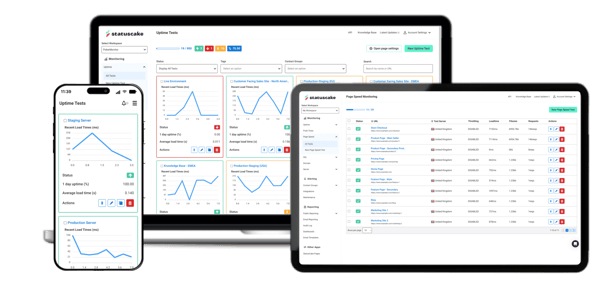
StatusCake vs Uptime Robot
A fair, honest comparison for teams choosing their website monitoring tool.
Uptime Robot is one of the most widely used uptime monitoring tools in the world; and for good reason. It’s quick to set up, easy to understand, and for many developers it’s the first monitoring tool they ever used.
This page isn’t here to tell you that Uptime Robot is a bad product, or that you’ve made the wrong choice by using it. Instead, it’s intended to be a straightforward comparison of StatusCake vs Uptime Robot, based on real user feedback from review sites like G2 and Capterra, how the wider monitoring market positions Uptime Robot, and how the needs of teams tend to evolve over time.
Our goal is simple. To help you decide which tool fits you best today, even if the answer is “stick with Uptime Robot for now.”
Who this comparison is for
This page is going to be of most use if you’re:
- a solo developer or small team running something business-critical;
- already using Uptime Robot, or actively comparing it with alternatives;
- starting to care more about alerting, reliability, and confidence; or
- reassessing tools because your monitoring needs have grown or a renewal is coming up.
It’s probably not the right place if:
- you only want a forever-free monitoring tool;
- you’re monitoring hobby or non-commercial projects; or
- you already know you want a full APM or observability platform.
We’re very comfortable stating that if your priority is a generous free plan and very simple uptime checks, then Uptime Robot is often the better choice.
StatusCake is designed for teams who are happy to pay for monitoring, but want fewer constraints and more confidence, without unnecessary complexity.
What Uptime Robot does genuinely well
Before comparing tools, it’s important to be clear about why Uptime Robot is so popular.
Uptime Robot is consistently praised for how quickly you can get started. You don’t need to understand monitoring in depth to get value from it, and many users describe it as something they can “set and forget”.
That simplicity is a genuine strength.
The free plan is genuinely generous
Uptime Robot’s free tier is one of the biggest reasons people choose it. For side projects, early experiments, or non-commercial use, it offers a lot without asking for payment.
Many users start on the free plan and stay with the product for years; which speaks to how approachable it is.
A long-standing, familiar brand
Uptime Robot has been around a long time, and for many people it was their first experience of uptime monitoring. That heritage builds familiarity and trust:
“It’s worked for years — why change it?”
That’s a reasonable question. And one we’ll come back to.
Why teams start re-evaluating Uptime Robot
Most people don’t stop using Uptime Robot because something is “wrong”. More often, re-evaluation happens when needs change:
- a project becomes more business-critical;
- more people need to receive alerts;
- alerting needs to integrate with existing workflows;
- monitoring expands beyond simple uptime; or
- renewal forces a fresh decision.
This is a common pattern with monitoring tools. Early on, simplicity is the priority; whilst later, confidence, flexibility, and predictability matter more. At that point, teams often feel stuck between staying with a tool that’s starting to feel restrictive, or jumping straight to a full APM or observability platform that feels like overkill. This gap is exactly where StatusCake is designed to fit.
Alerting philosophy. Where the biggest differences between StatusCake and Uptime Robot show up
Alerting is often the first area where small teams feel real friction.
Early on, alerting is simple:
“Tell me when my site is down.”
As teams grow, alerting usually becomes more nuanced:
- more than one person needs to know;
- alerts need to go to multiple channels; or
- workflows change over time.
Uptime Robot’s approach
Uptime Robot limits alerting through notify seats, which control who can receive alerts based on your plan. Whilst for solo users, this often isn’t an issue, for teams this can become a real challenge, and it’s something that tends to surface later when workflows evolve.
“Alerting works fine at first, but once you need to notify more people it becomes limiting unless you upgrade.”
StatusCake’s approach
StatusCake doesn’t limit who can receive alerts or how many alert channels you can configure. We believe alerting should reflect how you work.
- some teams rely on Slack;
- others use email, SMS, or webhooks, or other integrations; and
- many use a combination.
Rather than forcing you to plan around pricing tiers, StatusCake lets you decide who gets alerted and how.
Pricing & scaling: avoiding surprises later
When teams express frustration with monitoring tools, it’s rarely just about price. More often, it’s about unexpected constraints such as limits on alert recipients, restrictions on integrations, or sudden jumps in cost as usage grows.
None of this is hidden with Uptime Robot, but it’s easy to underestimate early on. To make this concrete, here’s how StatusCake vs Uptime Robot compare at common usage points.
| Area | Uptime Robot | StatusCake |
|---|---|---|
| Typical use case | Solo users → small teams | Small teams → growing teams |
| Check interval | 60s (30s on higher tiers) | 60s (30s on Business+) |
| Example monitor count | 100 monitors (~$34/mo) | 100 monitors ($24.99/mo) |
| Login seats | Limited by plan | Included, scales by plan |
| Alert recipients | Limited notify seats | Unlimited alert channels |
| Alert methods | Email, limited integrations | Email, SMS, Slack, webhooks, more |
| Page speed monitoring | ❌ Not available | ✅ Included on paid plans |
| SSL & domain monitoring | Basic | More advanced & configurable |
| Status pages | Included | Included (plan-dependent) |
| Billing options | Card only | Card + invoice / PO (Business) |
| Migration help | Self-managed | Hands-on setup & migration review |
“Pricing is reasonable, but the way limits are spread across plans can be confusing as you scale.”
This isn’t about one approach being “right” or “wrong”, but for teams planning to grow, predictability tends to matter.
More than uptime, without becoming APM
Another reason teams start looking beyond Uptime Robot is that uptime alone stops answering all their questions.
For example:
- “The site is up — but is it slow?”
- “Are load times getting worse over time?”
- “Can we catch performance regressions early?”
Uptime Robot focuses on availability. Alongside uptime, StatusCake goes further by also covering page speed, server monitoring, and more advanced SSL, and domain monitoring. This is important in providing teams with a broader view of availability and performance.
This allows you to:
- track performance trends over time;
- spot regressions before users complain; and
- understand how pages load, not just whether they respond
Importantly, this isn’t full APM so there’s:
- no code instrumentation;
- no complex observability stacks; and
- no steep learning curve.
It’s performance monitoring designed to complement uptime, not replace your entire toolchain.
“I don’t want to migrate”: fear vs reality
One of the biggest reasons teams delay switching from Uptime Robot isn’t features, it’s migration anxiety. Common concerns include:
- “This will take too much time”
- “I’ll miss something important”
- “I don’t want to learn a new system”
These concerns are understandable. Monitoring feels like infrastructure, and changing infrastructure feels risky. But in practice, many teams who switch to StatusCake say the experience was far easier than expected, especially when they don’t try to do everything at once. A typical migration might look like:
- reviewing your existing monitors;
- recreating core checks in StatusCake;
- running both tools in parallel;
- validating alerts; and
- switching gradually, not all at once.
There’s no automated import tool today, and we’re transparent about that, but we do offer hands-on help to make sure nothing is missed.
How we help you switch safely
If you’re currently using Uptime Robot, we don’t expect you to “rip and replace”. We’ll help you:
- review your existing monitoring setup;
- map equivalent checks and terminology;
- validate alerting before it matters; and
- run tools side-by-side while you evaluate.
If you’re mid-contract, we’re also happy to discuss helping cover remaining costs, reviewed case-by-case, so you’re not paying twice while deciding.
Even if you ultimately don’t switch, the goal is simple. To help you make an informed decision with confidence.
So… should you stick with Uptime Robot or switch?
You’ll probably be happiest sticking with Uptime Robot if:
- you want a forever-free monitoring tool;
- you’re monitoring simple or non-commercial projects;
- alerts only need to reach one person; and
- uptime alone is enough.
You should consider StatusCake if:
- you’re paying for monitoring and want fewer constraints;
- alerting needs to reach multiple people or systems;
- you care about page speed and performance trends;
- you want predictable scaling; or
- you value human help during setup and migration.
Neither choice is wrong. The right fit depends on where you are today.
Knowledge base
Useful articles relating to Alternative to Uptime Robot
.
Free
For individuals and small businesses.The basics of StatusCake monitoring.
€0/ month
What do you get with free?
5 Mins Test Intervals
1 Page Speed Monitor
1 Domain Monitor
1 SSL Monitor
Alerts through Integrations
.
Superior
Access more monitoring tools and more customisation. Perfect for small businesses.
From€16.66
/ month
What do you get?
1 Min Test Intervals
15 Page Speed Monitors
50 Domain Monitors
50 SSL Monitors
3 Server Monitors
Alerts through Integrations
Reporting
Most Popular
Business
The full StatusCake suite. For larger companies and Dev Ops teams.
From€58.33
/ month
What do you get?
30 Secs Test Interval
30 Page Speed Monitors
120 Domain Monitors
100 SSL Monitors
10 Server Monitors
Alerts through Integrations
Reporting
Team tools
.
Enterprise
Build a plan to suit your business. Scale with bolt ons.
Custom/ month
Build your own plan
Constant Check Rate
Dedicated Uptime & Page Speed Locations
Service Creditable SLAs
Regular Account Reviews