

Want to know how much website downtime costs, and the impact it can have on your business?
Find out everything you need to know in our new uptime monitoring whitepaper 2021


Recently we’ve had a lot of requests for examples of how add new tests through the StatusCake API using the popular Postman tool. In this article we’ll take you through some of the steps required to get you going with this method, below you’ll find an example for each test type we offer, taking you through the process of adding a test.
First off we need to cover the authentication method that will be required to make the API calls through Postman, you will need to obtain your API key and username from the “User Details” section of the StatusCake App, these should then be input into the “Headers” Section of Postman as shown below:
Now that all of our calls will carry with them the required authentication details, we can look at how to proceed in setting up the tests.
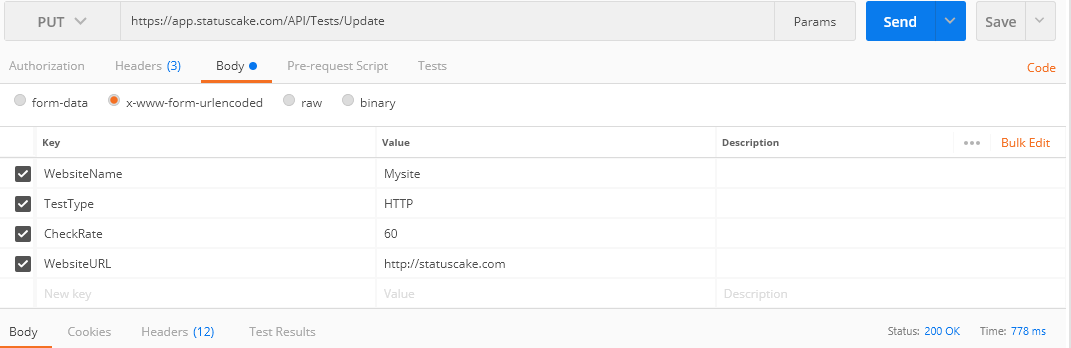
Taking the fields from our API documentation you should enter the settings that you’d like applied to the Uptime test that you are adding, every time an uptime test is created you must at least include as a minimum: TestType, Checkrate, WebsiteName, and WebsiteURL. The call should be submitted as PUT.
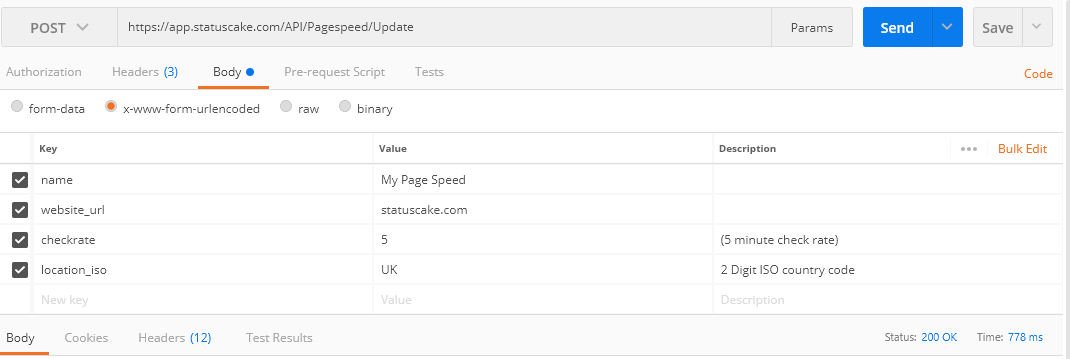
Page speed testing works similarly, and you can grab the fields that can be used from our API docs here. The required fields for this one are: name, website_url, location_iso, and checkrate. The POST method is required for this one.
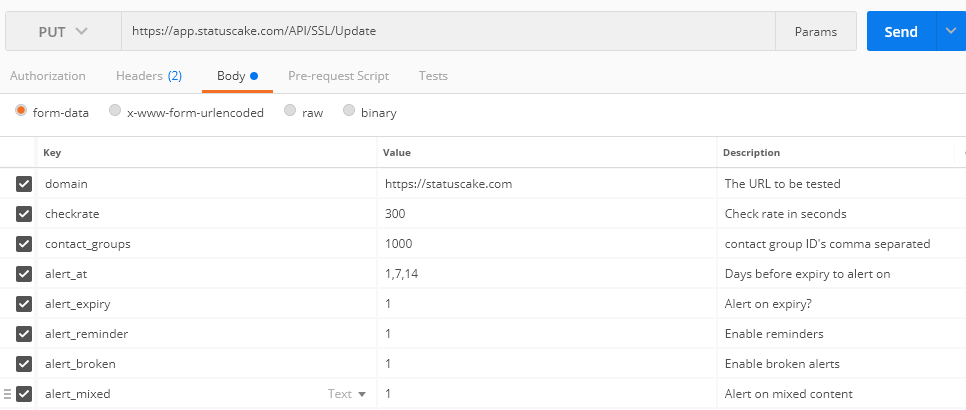
For SSL testing the PUT method should be utilized, and the required fields are: domain, checkrate, contact_groups, alert_at, alert_expiry, alert_reminder, alert_broken and alert mixed.
Share this
3 min read In the previous post, we looked at how alert noise is rarely accidental. It’s usually the result of sensible decisions layered over time, until responsibility becomes diffuse and response slows. One of the most persistent assumptions behind this pattern is simple. If enough people are notified, someone will take responsibility. After more than fourteen years
3 min read In a previous post, The Incident Checklist: Reducing Cognitive Load When It Matters Most, we explored how incidents stop being purely technical problems and become human ones. These are moments where decision-making under pressure and cognitive load matter more than perfect root cause analysis. When systems don’t support people clearly in those moments, teams compensate.
4 min read In the previous post, we looked at what happens after detection; when incidents stop being purely technical problems and become human ones, with cognitive load as the real constraint. This post assumes that context. The question here is simpler and more practical. What actually helps teams think clearly and act well once things are already
3 min read In the previous post, we explored how AI accelerates delivery and compresses the time between change and user impact. As velocity increases, knowing that something has gone wrong before users do becomes a critical capability. But detection is only the beginning. Once alerts fire and dashboards light up, humans still have to interpret what’s happening,
5 min read In a recent post, I argued that AI doesn’t fix weak engineering processes; rather it amplifies them. Strong review practices, clear ownership, and solid fundamentals still matter just as much when code is AI-assisted as when it’s not. That post sparked a follow-up question in the comments that’s worth sitting with: With AI speeding things
4 min read Why strong reviews, accountability, and monitoring matter more in an AI-assisted world Artificial intelligence has become the latest fault line in software development. For some teams, it’s an obvious productivity multiplier. For others, it’s viewed with suspicion. A source of low-quality code, unreviewable pull requests, and latent production risk. One concern we hear frequently goes
Find out everything you need to know in our new uptime monitoring whitepaper 2021