At StatusCake we’ve got a powerful and ever-growing API which allows you to automate many tasks, and also to take advantage of functions that are not available in-app.
The Basics
You can communicate with our API through most common coding languages, through this article we will provide code examples in terminal bash, PHP, and Python, as well as an example of how to manually run the commands through a common tool for such tasks: PostMan.
The first thing you need to bear in mind when using the API is that all of your calls will need to be validated using the Username and API key, both of these details can be found in the user details section of your account.
For the full list of settings that can be added along with your new test please check this page.
Adding with PHP via a curl
When using a the PHP curl method you’ll want something very similar to the code shown below, just replace the values with your desired parameters. You can see a full list of the available parameters here.
[blockquote align=”left” reverse=”off”]
// Enter your personal API key and Username to use for authentication , and also the data to insert
$API = “l6OxVJilcD2cETMoNRvn”;
$Username = “StatusCake”;
$InsertData = array(“WebsiteName”:”My new test”, “Paused” : 0, “WebsiteURL”: “https://www.statuscake.com”, “CheckRate” : “60”, “TestType” : “HTTP”);
// Create the CURL, set the options, remember to use the PUT request type and add the Username and API values to an array.
$ch = curl_init(“https://app.statuscake.com/API/Tests/Update”);
curl_setopt($ch, CURLOPT_RETURNTRANSFER, true);
curl_setopt($ch, CURLOPT_CUSTOMREQUEST, “PUT”);
curl_setopt($ch, CURLOPT_POSTFIELDS,http_build_query($InsertData));
curl_setopt($ch, CURLOPT_HTTPHEADER, array(
“API: “.$API,
“Username: “.$Username
));
// For Debugging, find out if something is going wrong
$Response = curl_exec($ch);
$Response = json_decode($Response);
// Check to see if everything has worked, and print a message indicating whether this was the case
if ($Response->Success == 1) {
echo ‘Inserted Test!’;
} else {
echo ‘Something Went Wrong<BR>’;
echo $Response->Message;
}
}
[/blockquote]
Adding through a terminal with bash
With this method we are looking at significantly less typing, it’s very important once again to ensure that this is always sent as a PUT request. The command should be run from a linux based system accessed through SSH or something similar.
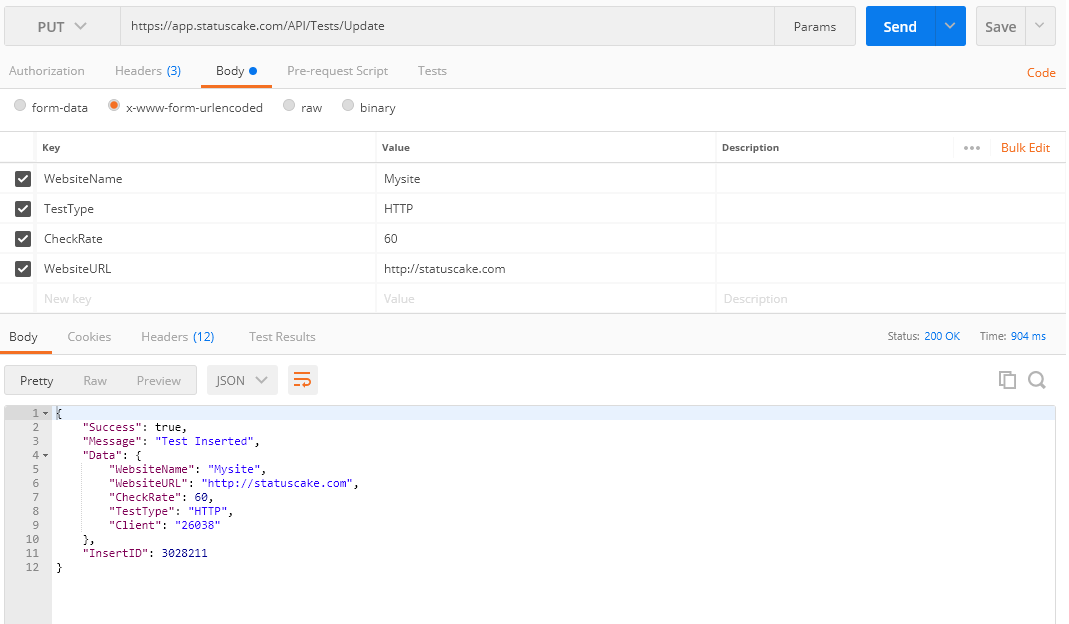
Using Postman can be a good manual method, and a way of testing your settings before automating them. Below we’ve included an image showing an example of how to enter the details into the Postman software, API key and Username should be entered separately in the “Headers” section.
4min read On 13th August 2026, a storm knocked out cooling at RadiusDC’s Phoenix data centre, which hosted essential Namecheap operations. To protect hardware from thermal damage, Namecheap took services offline while temporary chillers were brought in. The incident and recovery ran for roughly 30 hours, with Namecheap’s own site unreachable for about 11 hours 42 minutes
3min read On Wednesday 19 August, Monzo had an outage. DownDetector logged more than 3,000 reports by midday. Monzo’s own statement was direct about what it did next: it activated Monzo Stand-in, its fully independent backup bank, while it investigated an issue affecting customers. By the end of the day, Monzo said the issue was resolved and
3min read GitHub’s incident on 17 August 2026 ran from 13:28 to 21:15 UTC, seven hours and forty-seven minutes. At peak, web and API traffic saw error rates of around 20%, while archive and raw-content downloads reached roughly 50%. SAML and OIDC authentication, SCIM and Team Sync were affected alongside Git operations, Actions, Pages, Issues, Pull Requests
3min read Adding a new website, launching a customer portal, or handing a service to a new team should be straightforward. Setting up monitoring is part of that job, but it is easy for a manual step to be missed when information is spread across several systems. StatusCake now integrates with viaSocket, giving teams a way to connect
7min read A website may be standing and still be in trouble. It may answer a request, return a cheerful 200 OK, and yet load slowly enough that visitors begin to lose patience. Its certificate may be nearing expiry. Its domain records may have changed. A server may be filling its disk in the background, patient and
6min read StatusCake tells you that something might be broken. Hermes can check whether it really looks broken, decide who should hear about it, send the email, and keep the record for tomorrow morning’s summary.
Daniel
May 13, 2026
Sign up for the StatusCake newsletter
Want to know how much website downtime costs, and the impact it can have on your business?
Find out everything you need to know in our new uptime monitoring whitepaper 2021