StatusCake

Use Case: Using Maintenance Windows to Set Up Alert Schedules

dev

For many of our users reacting to downtime data sent from a monitoring system such as StatusCake is a 24 hour job, and the process incorporates many staff who will have varying responsibilities, and sometimes work quite different hours.  This is particularly true of companies who run “follow-the-sun” with their global dev-ops teams picking up the baton from the last as their time zone starts its working day.

For this reason, it can be very useful to have a method for splitting out which team alerts go to at different times.  Today we’ll take you through a method for using our Maintenance Windows feature in this way.

For example, let’s first use a scenario where you have two separate teams:

  • Team A works a 12 hour shift from Midday until Midnight; and
  • Team B takes over from Midnight to Midday.

We want each team to only be alerted of downtime during their working hours.

To achieve this you would set-up two tests in StatusCake; each test would be identical to the other, for instance in relation to interval check rate, confirmation servers and so on, however, there would be two differences.

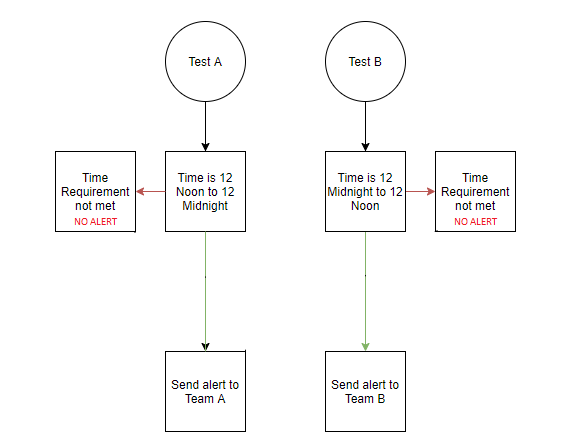
  • Test 1 – The Contact Group would be set-up for Team A members and a Maintenance Window for Midnight to Midday set-up.
  • Test 2 – The Contact Group would be set-up for Team B members and a Maintenance Window for Midday until Midnight set-up.

This ensures that when the site goes down it will only alert the team on call.  You can, of course, add as many teams to this following the same set-up process – e.g. for three teams add a third test and set the Contact Group and Maintenance Window according.

Once you’ve everything up you will have an on call schedule as shown in the diagram below:

schedule

We already have this use-case working for quite a few of our customers who don’t want to use additional third-party integrations to handle alert scheduling.  If you have any questions about this use-case, or indeed have any great use-cases of your own that you’d like to share with us then please let us know.

Share this

More from StatusCake

Alerting Is a Socio-Technical System

3 min read In the previous posts, we’ve looked at how alert noise emerges from design decisions, why notification lists fail to create accountability, and why alerts only work when they’re designed around a clear outcome. Taken together, these ideas point to a broader conclusion. That alerting is not just a technical system, it’s a socio-technical one. Alerting

Designing Alerts for Action

3 min read In the first two posts of this series, we explored how alert noise emerges from design decisions, and why notification lists fail to create accountability when responsibility is unclear. There’s a deeper issue underneath both of those problems. Many alerting systems are designed without being clear about the outcome they’re meant to produce. When teams

A Notification List Is Not a Team

3 min read In the previous post, we looked at how alert noise is rarely accidental. It’s usually the result of sensible decisions layered over time, until responsibility becomes diffuse and response slows. One of the most persistent assumptions behind this pattern is simple. If enough people are notified, someone will take responsibility. After more than fourteen years

Alert Noise Isn’t an Accident — It’s a Design Decision

3 min read In a previous post, The Incident Checklist: Reducing Cognitive Load When It Matters Most, we explored how incidents stop being purely technical problems and become human ones. These are moments where decision-making under pressure and cognitive load matter more than perfect root cause analysis. When systems don’t support people clearly in those moments, teams compensate.

The Incident Checklist: Reducing Cognitive Load When It Matters Most

4 min read In the previous post, we looked at what happens after detection; when incidents stop being purely technical problems and become human ones, with cognitive load as the real constraint. This post assumes that context. The question here is simpler and more practical. What actually helps teams think clearly and act well once things are already

When Things Go Wrong, Systems Should Help Humans — Not Fight Them

3 min read In the previous post, we explored how AI accelerates delivery and compresses the time between change and user impact. As velocity increases, knowing that something has gone wrong before users do becomes a critical capability. But detection is only the beginning. Once alerts fire and dashboards light up, humans still have to interpret what’s happening,

Want to know how much website downtime costs, and the impact it can have on your business?

Find out everything you need to know in our new uptime monitoring whitepaper 2021

*By providing your email address, you agree to our privacy policy and to receive marketing communications from StatusCake.