



Want to know how much website downtime costs, and the impact it can have on your business?
Find out everything you need to know in our new uptime monitoring whitepaper 2021

We’ve got a few things to bring you up to speed with today, and you can find all the information below!
Our new Alert Log feature gives you a high level of visibility on alerts that have been sent out by our system, you can see the timing, and status of any alert we send no matter the alerting method.
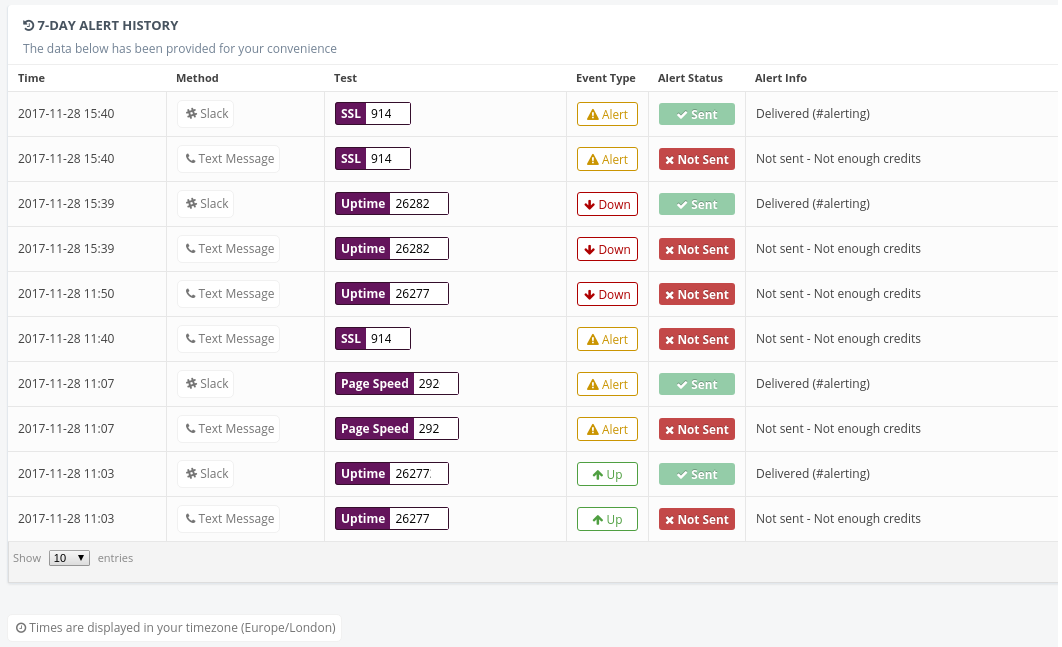
This new feature is available for all plans, so you can take advantage of the data whether you are on our free or Enterprise package! You’ll be given the reasons for any alert failures, some examples including running out of SMS credits and incorrect contact details. As well as a full log of all alerts sent out, with this tool you can also see logs of reports generated by features like Virus Scan.
You can access this new feature by going to the Contact Groups section of your account, and from here you can see the alert logs for each Contact Group on your account.
We’ve implemented a summary of which tests will be updated upon filtering for all Bulk Updates. This means that each time you run an update in bulk you’ll be able to see which tests were affected to the right side of the page.

First off we’ve made some improvements to the screen which displays all of your tests, primarily the changes are contained within the “Box View” layout, we’ve changed the buttons on the test boxes to be smaller and more accessible, and we’ve ensured that all of the options for each test can be easily accessed without needing to drill down into the test’s details.
We’ve also somewhat standardized the entry system for the email addresses in the Contact Groups to closely match the phone number entry section.
This means now that it will not be possible to miss alerts due to formatting errors, all previous phone numbers have of course been ported over to the new system already!
Following user requests, we’ve increased the burst limit for our API to 20 per second, up from 10. To accommodate this change and also to prevent abuse in future we have elected to have a daily limit of 100,000 API calls per account – this is a level at which we can see that very few users will be affected, and we feel that it’s a fair limit in terms of using our API on any paid plan. There are no changes to this on the free level plan, and the same limit of 250 calls per day will apply.
