

StatusCake

New Functionality: Mixed Content Checking For SSL

Why is avoiding mixed content on your pages important?

Mixed content occurs when the site is accessed over a HTTPS secure connection, but other resources on the page are loaded through an insecure connection. This is defined as “Mixed Content” as both HTTP and HTTPS content are being loaded on the same page when the request started as a secure HTTPS request.

In most cases, users will receive a warning from their browser to indicate that this is the case when visiting the site.

5.7% of Sites are Impacted
StatusCake Sample Size of 100,000 URLs

To protect the integrity, security, and secrecy of your data where necessary. It’s required that all resources be served over a HTTPS connection. If there’s a single resource on any given page that’s not secured in this way then your users will be informed that the page is not fully secure upon visiting.

Having a fully secured page will assure your users of the following facts:

  • Visitors can be sure of the identity of the website.
  • Visitors can be sure that nobody has tampered with the data they send and receive.
  • Visitors can be sure that nobody unauthorized can view the data that they send and receive.

The Solution

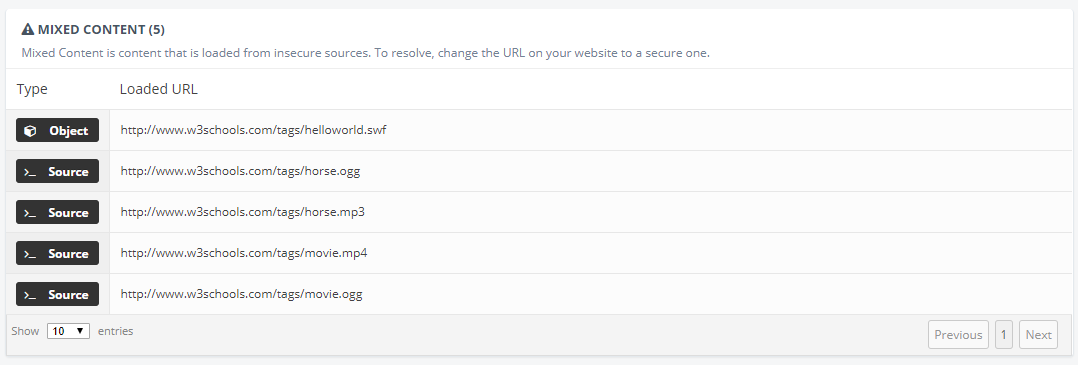
With StatusCake you can now ensure that none of your pages contain Mixed Content, we’ve built this functionality into our SSL monitoring feature, so you can now be alerted the moment anything of this nature is found.

MConent

It’s important to note that mixed content will only be detected by us on the page you are testing, so a test on your homepage’s URL for SSL will not detect mixed content on other pages of the website. If you want to test more than one page then multiple tests would be required. Also worth remembering is that resources requested from scripts or within iframes will not be checked.

The option is enabled by default for all SSL testing as it’s an essential thing to watch out for – and alerting will fire automatically for any SSL tests that currently have a contact group. If you do not have a contact group attached to your SSL test it’s just a case of adding one and then entering the settings to select the “Mixed Content” check box.

For information on how to use the feature please check out our Knowledgebase article here.

Share this

More from StatusCake

What the Namecheap Outage Revealed About DNS Recovery

4 min read On 13th August 2026, a storm knocked out cooling at RadiusDC’s Phoenix data centre, which hosted essential Namecheap operations. To protect hardware from thermal damage, Namecheap took services offline while temporary chillers were brought in. The incident and recovery ran for roughly 30 hours, with Namecheap’s own site unreachable for about 11 hours 42 minutes

Monzo’s Stand-In Held Up on Wednesday. Some Customers Still Had a Bad Day.

3 min read On Wednesday 19 August, Monzo had an outage. DownDetector logged more than 3,000 reports by midday. Monzo’s own statement was direct about what it did next: it activated Monzo Stand-in, its fully independent backup bank, while it investigated an issue affecting customers. By the end of the day, Monzo said the issue was resolved and

What Broke GitHub on August 17 and How Retries Made the Incident Worse

3 min read GitHub’s incident on 17 August 2026 ran from 13:28 to 21:15 UTC, seven hours and forty-seven minutes. At peak, web and API traffic saw error rates of around 20%, while archive and raw-content downloads reached roughly 50%. SAML and OIDC authentication, SCIM and Team Sync were affected alongside Git operations, Actions, Pages, Issues, Pull Requests

Automate StatusCake Monitoring with viaSocket

3 min read Adding a new website, launching a customer portal, or handing a service to a new team should be straightforward. Setting up monitoring is part of that job, but it is easy for a manual step to be missed when information is spread across several systems. StatusCake now integrates with viaSocket, giving teams a way to connect

Website Monitoring Checklist: What to Track Beyond Uptime

7 min read A website may be standing and still be in trouble. It may answer a request, return a cheerful 200 OK, and yet load slowly enough that visitors begin to lose patience. Its certificate may be nearing expiry. Its domain records may have changed. A server may be filling its disk in the background, patient and

Want to know how much website downtime costs, and the impact it can have on your business?

Find out everything you need to know in our new uptime monitoring whitepaper 2021

*By providing your email address, you agree to our privacy policy and to receive marketing communications from StatusCake.